Text & Fly
- 4.5
- Rating
- 1.00M
- Installs
- Free
- Price
 Analysis by App-foxy
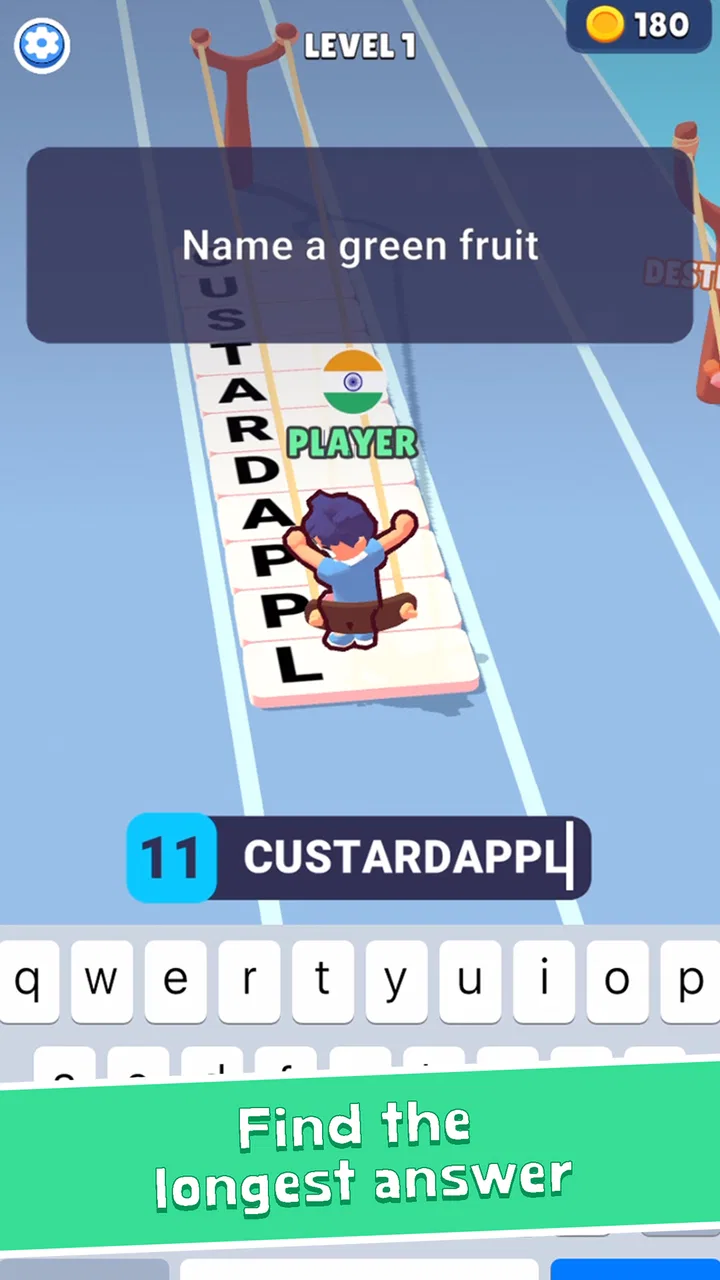
I approached Text & Fly as a quick casual game rather than a long-form trivia experience, and that distinction matters. Its central idea is simple: answer trivia by typing while trying to keep the action moving. The result is a game that can fit into a short break, but it still asks for enough attention that I would not call it a completely passive time-killer. I found the appeal strongest when I wanted a compact challenge with a little pressure instead of a quiet quiz that lets me think indefinitely.
It comes from Kwalee Ltd and is free to play, with optional purchases listed between $1.62 and $3.99 per item. The game is rated for Everyone, runs on Android 7.0 or later, and its current version is 2.0.1. Those details make it approachable for a broad audience, although the fast typing focus means the practical experience can vary considerably from one player to another.
How clearly the game communicates what to do
The strongest part of the design is that the basic goal is easy to understand. You are not dealing with a large map, a complicated upgrade tree, or a long tutorial sequence before the main idea becomes clear. The combination of trivia and typing gives the game an immediate rhythm: read the prompt, work out the answer, and enter it before the opportunity passes. I appreciate that directness because it reduces the amount of navigation a player has to learn.
You May Also Like

 Blood Strike: 2.5 Anniversary
Blood Strike’s Loadouts Turn Every Drop Into a Tactical Gamble
A close look at Blood Strike’s custom loadouts: how fast access to signature weapons reshapes its battle royale rhythm, rewards preparation, and narrows the gap between fights.

 Pandora - Music & Podcasts
Pandora’s Music Is Easy to Start, but Harder to Recover
Pandora’s strength is its low-effort path from a seed to a station. Its weak spot is how much confidence it asks you to place in connection, setup, and quiet recovery.

 8 Ball Pool
 Is Built on Rivalries, Rematches, and Routine
A close look at the rivalries, rematches, shared routines, and unanswered safety questions that turn a quick pool match into a persistent mobile community.

 Samsung Music
’s Quiet Strength Is Playing What You Already Own
Its reach comes less from spectacle than from dependable access to a personal library. That simplicity is both the app’s strongest retention engine and its ceiling.

 AccuWeather: Weather Radar
AccuWeather Review: A Quick, Clear Forecast for Everyday Decisions
For everyday plans, the best forecast is the one you can understand quickly. AccuWeather makes rain timing, radar, and local conditions easy to act on, with a few trade-offs.

 Hill Climb Racing
Why Hill Climb Racing Still Turns Crashes Into One More Run
A tiny car, a bumpy hill and one more upgrade: Hill Climb Racing keeps resurfacing because its simple chaos makes every near-miss feel personal.
More From Our News Desk
View All News


That simplicity also helps when I return after a few days away. I do not need to remember a complicated control scheme or reconstruct a story. The game’s identity is built around answering and typing, so the next action is usually obvious. For someone who prefers games with a low learning curve, that is a meaningful advantage over casual titles that bury their main activity beneath menus, collections, or layered rewards.
At the same time, readable design is not only about knowing the objective. Trivia games depend on being able to distinguish the prompt, the input area, the current state of the round, and any feedback after an answer. When the pace rises, even a small amount of visual clutter can make a question feel harder than its subject matter deserves. I found myself paying attention to the screen in a way I would not need to do with a slower multiple-choice quiz.
This is one reason I would suggest trying the game in a calm setting before deciding whether it suits you. A player with comfortable vision and quick reading may find the presentation easy to follow, while someone who needs more time to scan text may experience the same round as a reaction test. The game’s casual label describes its overall format, but the typing element gives it a sharper edge than a relaxed trivia app.
There is also a useful difference between playing for a minute and playing for several rounds. In a short session, the compact structure feels efficient. Over a longer session, repeated reading and typing can make the interface feel more demanding, particularly if I am concentrating on accuracy rather than simply tapping through. I recommend treating it as a series of brief challenges instead of assuming it will provide the same comfort as a conventional quiz app.
The game has attracted over one million installs, and its average rating is 4.5 from around seventeen thousand ratings. That suggests the basic concept connects with a substantial audience, but popularity should not be mistaken for universal suitability. A typing-centered game naturally favors players who can read quickly, enter text comfortably, and tolerate mistakes under pressure.
Readability is tied to the speed of the round
One of the less obvious points is that the game tests two skills at once. Knowing an answer is only half the task; expressing it through the available typing interaction is the other half. That creates a trade-off for players who enjoy trivia but do not enjoy keyboards on a phone. In a standard quiz, I can often recognize the correct option immediately. Here, recognition does not necessarily translate into a successful response if my typing is slow or inaccurate.
For the best experience, I would hold the phone in the position that gives me the most stable access to the keyboard and avoid playing while walking or multitasking. I would also begin with short sessions, because fatigue can make both reading and typing less precise. This is not a hidden setting or a special technique; it is simply the most practical way I found to keep the game from turning into an uncomfortable scramble.
Players who use enlarged system text or other display adjustments should pay attention to whether the game remains comfortable at their preferred settings. I would not assume that every visual adjustment made at the operating-system level will produce the same result inside every game. If the text or controls become difficult to distinguish, the problem is not likely to be solved by knowing more trivia. Testing the presentation early is more useful than committing to a long session.
Motor, sensory, and cognitive demands
The typing mechanic makes motor access especially important. This is not a game where every action can be replaced by a single large tap. Entering answers requires repeated interaction with a phone keyboard, and that can be tiring or frustrating for people with limited dexterity, tremor, joint pain, or difficulty making precise touches. Even players without a disability may notice that the pressure of a timed response makes ordinary typing errors feel more significant.
I also see a difference between one-handed and two-handed play. One-handed use may be convenient during a short idle moment, but it can be less stable when the answer is longer or when I need to type quickly. Two-handed typing is generally more practical for accuracy, although it requires a more deliberate grip and a setting where I can focus on the screen. That makes the game less suitable for situations where one hand is occupied.
Players who rely on alternative input methods should consider the central trade-off carefully. If a keyboard, switch setup, voice input, or another method introduces extra delay or produces inconsistent text, the game’s challenge may become a test of the input method rather than a test of trivia knowledge. I would not recommend it as a first choice for someone specifically seeking a game designed around minimal motor effort.
Sensory comfort is another factor. Fast reading, changing feedback, and the need to watch the input area can create a higher concentration load than the word “casual” suggests. People who are sensitive to rapid visual activity or who become overloaded by competing information may prefer to play in a quiet environment with fewer distractions. The game works best when I can give it direct attention instead of trying to squeeze it into a noisy, crowded moment.
There is a cognitive accessibility angle as well. The questions may be familiar, but the player still has to retrieve an answer, spell it, and submit it within the flow of the round. That combination can be enjoyable for someone who likes pressure, yet discouraging for a player who needs extra processing time. A wrong result does not always mean the player lacked knowledge; sometimes it means the typing step consumed the available time.
That distinction is important when choosing between this and a typical trivia alternative. If my priority is learning facts at my own pace, I would choose a quiz with untimed questions, multiple-choice answers, or a review mode. If I want the extra challenge of turning recall into a quick physical response, this game offers a more distinctive experience. Neither approach is automatically better; they serve different needs.
Who will find the controls comfortable?
I think the best match is a player who already types comfortably on a phone and enjoys a little urgency. Younger players may appreciate the immediate interaction, and adults can use it as a short mental break without learning a large ruleset. The Everyone age rating makes the concept broadly approachable, but age suitability does not guarantee that every player will find the typing pace comfortable.
I would be more cautious about recommending it to someone who wants a fully relaxed game for winding down, someone who has difficulty with small touch targets, or someone who cannot easily use a touchscreen keyboard. It may also be a poor fit for players who dislike being judged on spelling or response speed. A slower trivia app, a multiple-choice game, or an audio-focused option would likely be more accommodating in those cases.
One practical use case is a short waiting period when I want something more engaging than scrolling but less demanding than a full action game. I can play a brief sequence, stop without losing an evening, and return later without needing to remember a plot. That makes it useful on a commute or during a break only when I am seated safely and can look at the screen. It is not a good choice while walking, crossing a road, or handling another task.
Situational access in everyday play
The game’s portability is one of its clear strengths, but portability and accessibility are not the same thing. A phone makes the game available in many places, yet the typing requirement means the surrounding situation matters. Bright sunlight, movement, background noise, low battery, or an awkward grip can all reduce comfort even if the game itself is easy to launch.
I would use it most confidently at home, in a waiting room, or during a seated break. In those settings I can position the phone properly and give the questions enough attention. I would avoid starting a round when I expect an interruption, because the game’s value comes from maintaining a response rhythm. A conventional offline puzzle or a turn-based title would be better for a situation where I may need to put the phone down without warning.
It can also work as a shared activity, but the typing focus changes how sharing feels. One person can answer while another watches, yet the player holding the phone remains responsible for reading and entering the response. That is different from a board-style trivia game where everyone can discuss an answer before selecting it. For a family or group, the most enjoyable approach may be taking turns rather than trying to make every round a collaborative discussion.
Players with different abilities can still enjoy the same concept if they have different roles. One person might read the question aloud while another types, or friends could take turns according to who feels comfortable with the keyboard. That does not remove the game’s built-in demands, but it creates a more inclusive way to engage with it socially. I would present this as a practical workaround, not as evidence that the game includes dedicated cooperative accessibility features.
The free entry point also helps with situational testing. I can install it, play a few rounds, and decide whether the text, pace, and keyboard interaction work for me before spending anything. Optional purchases may be available for players who want them, but I would not treat them as a solution to access barriers. Buying an item cannot change whether rapid typing, visual scanning, or the overall tempo is comfortable.
Compatibility is straightforward for many Android users because the game supports Android 7.0 and later. That covers a wide range of devices, but the experience can still vary with screen size, keyboard layout, and personal settings. A smaller display may make reading and typing feel more cramped, while a larger phone can give the input area more breathing room. I would judge it on the actual device I plan to use rather than relying only on the operating-system requirement.
Where the remaining barriers matter
The biggest limitation is that the game’s defining mechanic is also its main access barrier. Text entry is not an optional layer around the trivia; it is central to the experience. That means players who cannot comfortably type may not be able to substitute a different control style and still receive the same challenge. For some people, this will be a minor inconvenience. For others, it will decide the entire recommendation.
Time pressure can amplify that barrier. A player may understand the question, know the answer, and still lose momentum because of a missed letter or a delayed touch. I found that this can feel less fair than a normal wrong answer, especially when I am certain that my knowledge was not the problem. Players who prefer feedback that separates knowledge from typing performance may find the design frustrating.
Another limitation is attention management. The game is easy to start, but it is not always easy to play while distracted. Notifications, conversation, travel, and multitasking can interrupt the chain between reading and entering an answer. In that sense, it is more demanding than a simple idle game and less flexible than a turn-based quiz. The short format helps, but it does not eliminate the need for concentration.
I would also avoid presenting it as an educational replacement for a structured trivia platform. It can encourage recall and quick thinking, but its appeal is the contest between knowledge and response speed. Someone studying a subject, building vocabulary, or looking for detailed explanations would probably benefit more from an app designed around lessons, answer reviews, and adjustable pacing.
On the other hand, players who find ordinary quizzes too passive may appreciate precisely these limitations. The need to type gives each question a physical consequence. I have to commit to an answer rather than casually scanning choices, and that makes even familiar trivia feel more active. The trade-off is clear: more energy and immediacy in exchange for less room to pause, correct, or accommodate slower input.
Kwalee Ltd has positioned the game as a casual experience, and I think that description is accurate at the level of structure and accessibility of the rules. It does not mean every moment is effortless. The game is casual because it is easy to pick up, not because every player will find its response demands gentle. That distinction is worth keeping in mind before downloading it for someone who needs a very low-pressure experience.
My inclusive verdict
After spending time with it, I see Text & Fly as a focused typing-trivia game with a clear audience. It is a good fit for people who want quick rounds, enjoy recalling facts under pressure, and are already comfortable using a touchscreen keyboard. The free download makes it easy to test, and the Everyone rating supports its broad presentation, but the practical experience depends more on reading speed, motor control, and tolerance for timed input than those labels reveal.
My most useful advice is to test three things immediately: whether the question text is comfortable to scan, whether your keyboard allows accurate answers without strain, and whether the pace feels exciting rather than stressful. If all three work, the game can be a satisfying alternative to slower multiple-choice trivia. If one of them fails, a conventional quiz with adjustable timing or simpler answer selection will probably serve you better.
I would recommend it to a friend who wants a compact challenge for seated breaks and who likes the feeling of turning knowledge into quick action. I would not recommend it as a universal family game, an accessibility-first title, or a calm learning tool. Its strongest quality is its specific combination of recall and typing, and its main weakness is that the same combination can exclude or frustrate players who need more time or a different input method.
The game has a 4.5 average and more than one million installs, which fits my impression that its straightforward concept has broad appeal. Still, the right question is not simply whether other people enjoy it. The better question is whether its reading and typing demands match the way you use your phone. For the right player, it is a lively little trivia challenge; for anyone seeking maximum flexibility, slower pacing, or minimal motor effort, another casual game would be the kinder choice.
FAQs for Text & Fly
01What is the primary function of Text & Fly?
Text & Fly is designed to keep users connected while on the move. Its primary function is to enable users to send and receive text messages seamlessly while commuting or traveling. It incorporates safety features such as voice commands and auto-reply to ensure users remain focused on their journey.
02Is Text & Fly safe to use while driving?
Yes, Text & Fly is equipped with safety features specifically for use while driving. It includes voice command functionality, allowing users to send texts hands-free. Additionally, an auto-reply feature can inform contacts that you’re driving and will respond later, helping to minimize distractions.
03Does Text & Fly support multiple messaging platforms?
Text & Fly integrates with several popular messaging platforms, making it easy to manage all your communications in one place. This includes support for SMS, WhatsApp, and other messaging apps, ensuring you can stay connected with all your contacts without switching between apps.
04Is there a subscription fee for using Text & Fly?
Text & Fly offers a free version with basic features. However, for advanced features such as premium voice command options and customizable auto-reply messages, there is a subscription fee. This ensures users can choose the level of service that best fits their needs.
05What devices are compatible with Text & Fly?
Text & Fly is available for both Android and iOS devices. It supports a wide range of smartphones and tablets, ensuring compatibility with most modern devices. Regular updates are provided to maintain compatibility with new operating system versions and device models.
Pros
- Intuitive user interface for easy navigation.
- Offers a wide range of customizable features.
- Seamless integration with cloud services.
- Frequent updates with new features.
- Efficient use of battery and resources.
Cons
- Limited offline functionality.
- Occasional ads can be intrusive.
- Some features require a subscription.
- Initial setup can be time-consuming.
- Lacks advanced editing tools.

Text & Fly
Gallery